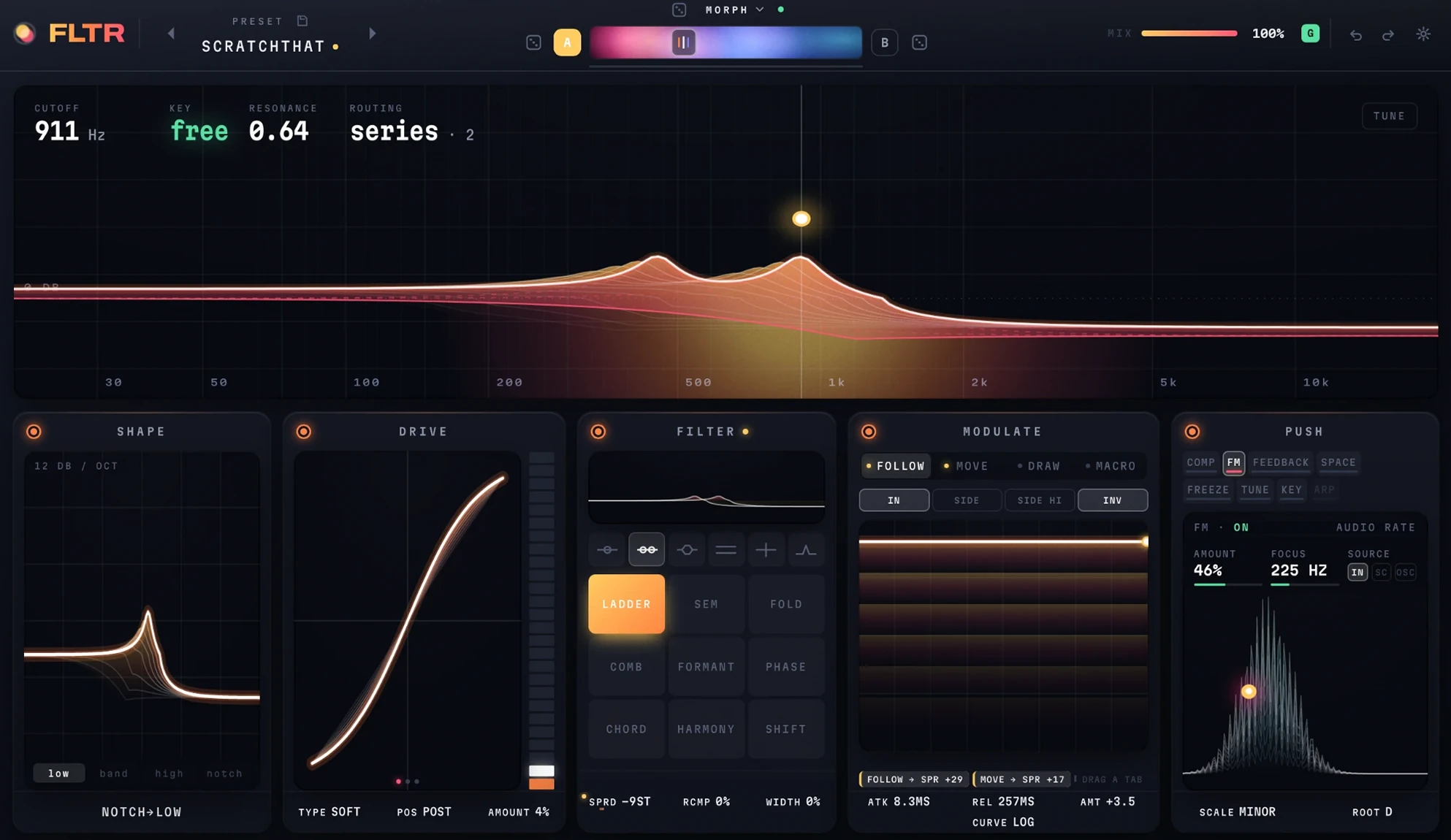
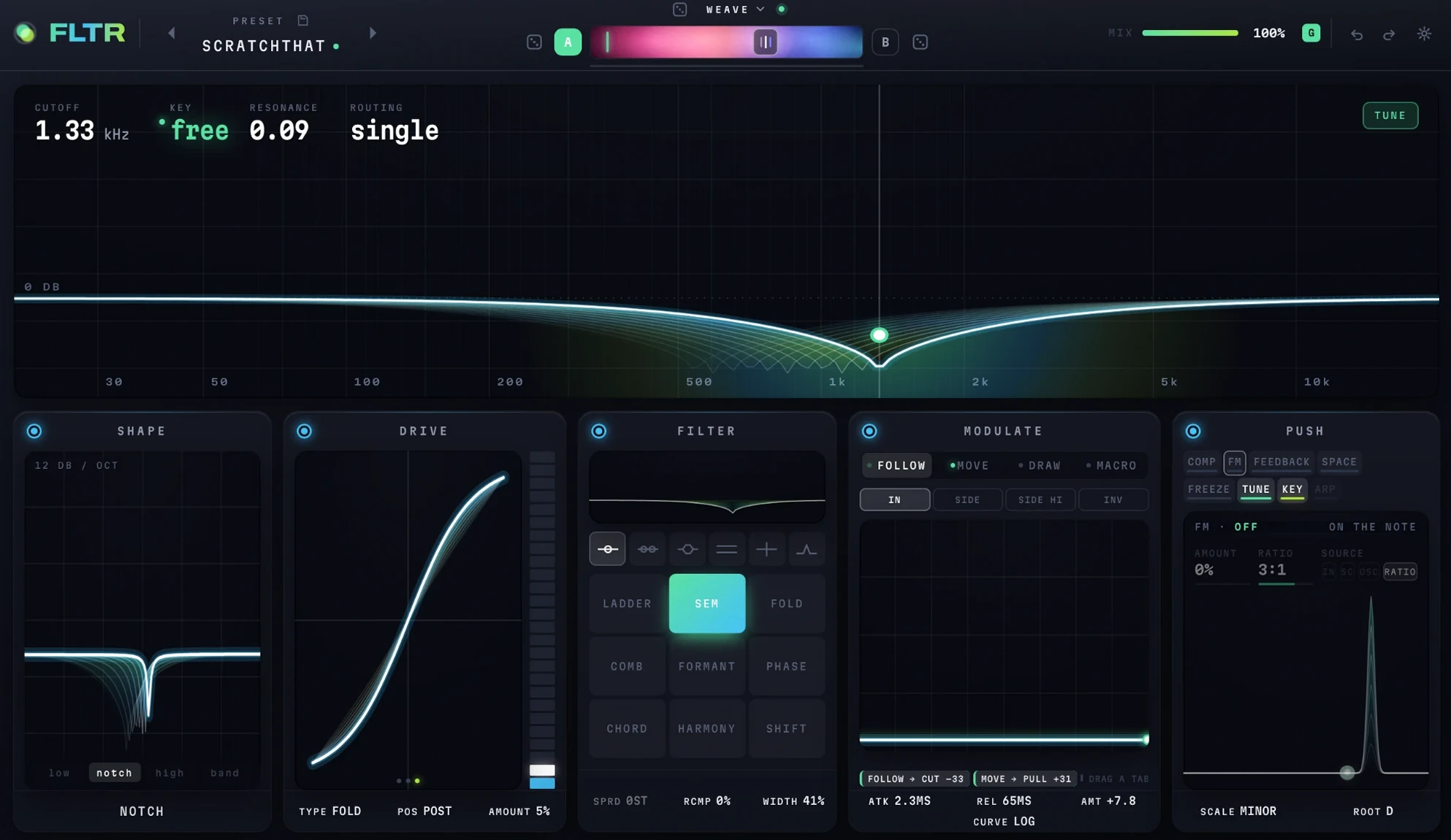
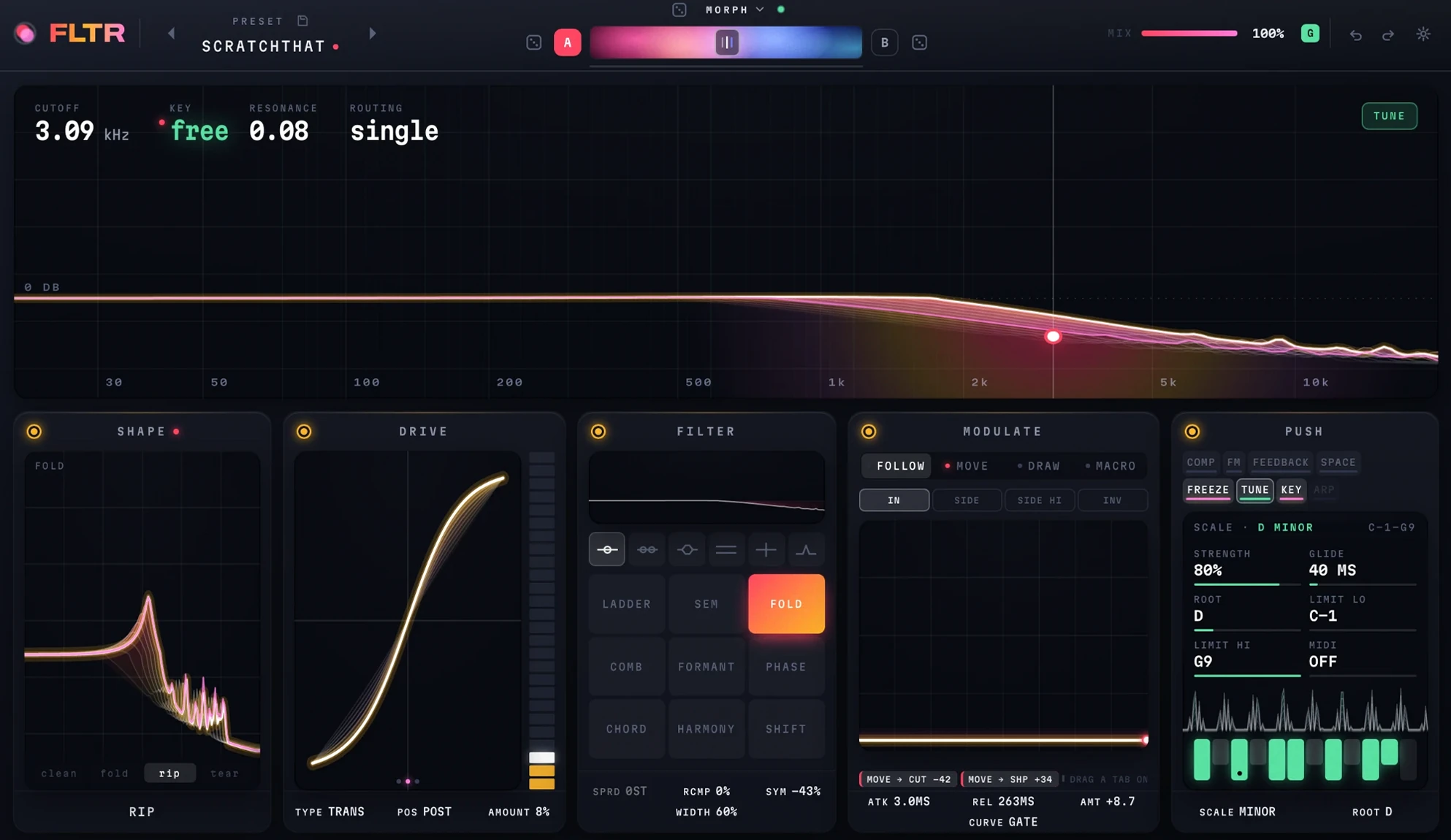
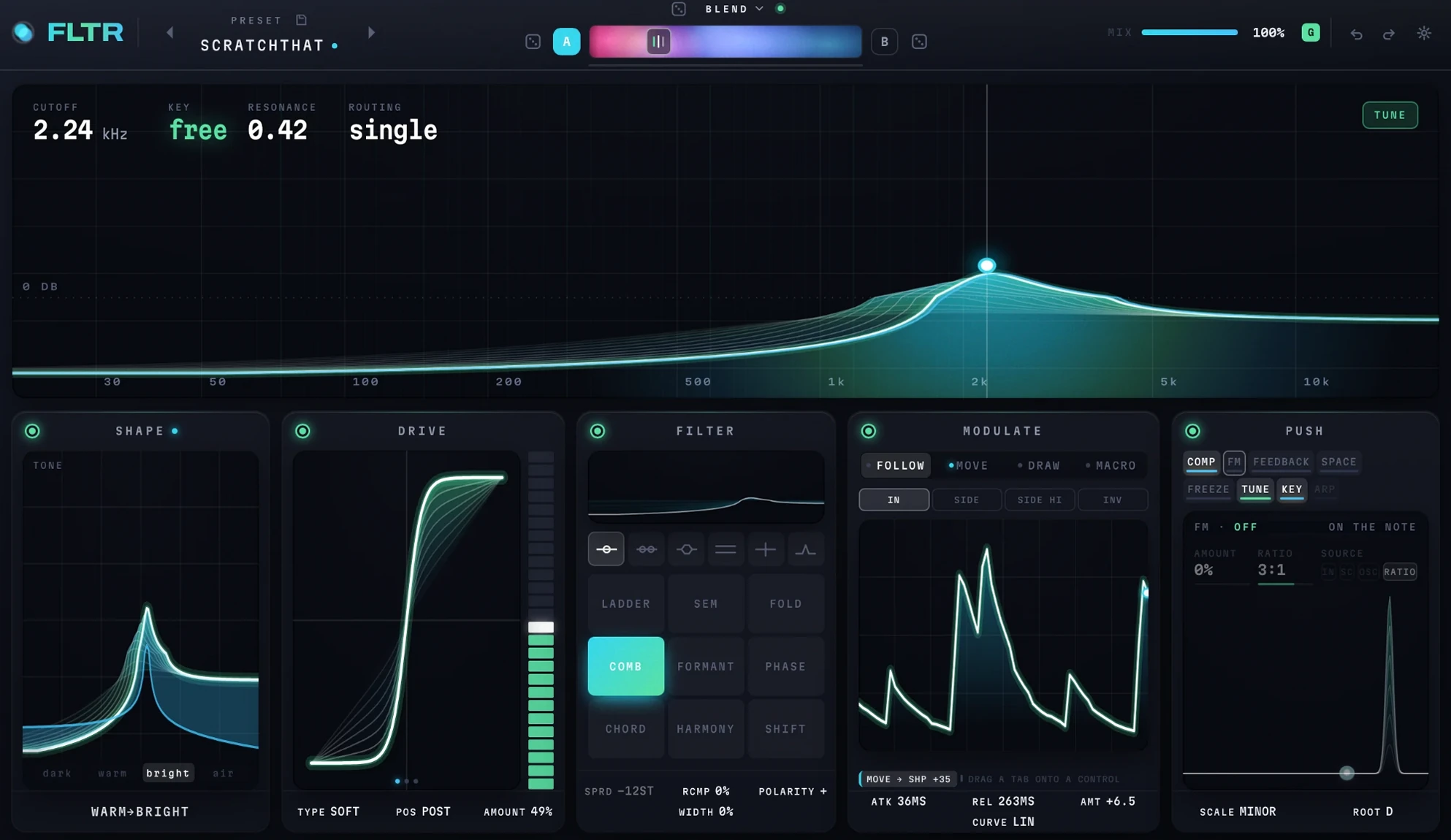
hover any control to see what it does - click a character in FILTER to see it runningtap any control to see what it does
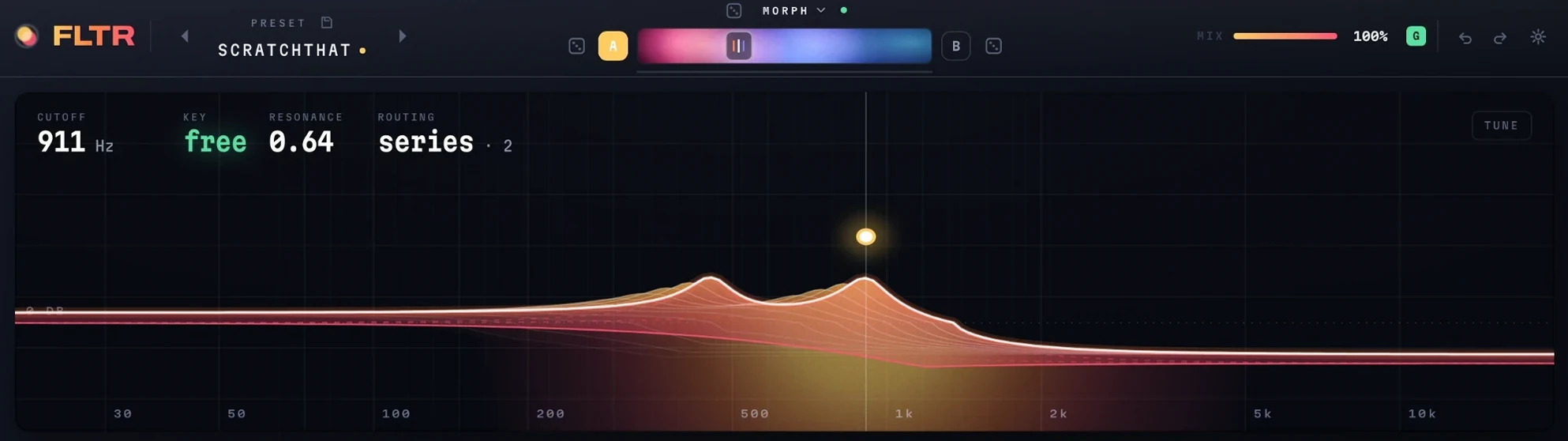
THE PADdrag the dot - across for cutoff, up for resonancetrythe bright curve is what you hear; the ghost behind it is what you set
CUTOFFwhere the filter sitstrymodulation on it is measured in semitones, so a depth is the same distance anywhere
KEYthe note the filter is ringing on - free until tune is on and resonance is past half
RESONANCEhow hard the filter rings at the cutofftrypast half, with tune on, the ring is a note in your scale
ROUTINGhow the cores are wired, and how many are running
TUNEsnaps the cutoff to the nearest note of the scaletrysweep the filter and it plays in key
PREVIOUS PRESETsteps back to the preset before this one
PRESETthe name opens the browser - search, folders, save and save astrypresets are plain files in a folder, so they can be moved and shared
SAVEsaves the sound as it stands
NEXT PRESETsteps on to the next preset
ROLLrandomises both sides and the morph type at oncetrythe dice beside A and B roll one side and leave the other
MORPH TYPEhow A becomes B - blend, morph, follow, weave, random or splittrysplit puts A below a crossover and B above it
ROLL Arandomises side A and leaves B as it is
Aone of two complete sounds - click to edit this onetryright-click the bar to copy one side to the other, or swap them
MORPHslides from sound A to sound Btrydrop a modulation tab on it and the morph moves by itself
Bthe second sound, with its own character and settings
ROLL Brandomises side B and leaves A as it is
MIXthe dry signal against the filtered onetrya modulation tab can be dropped here too
GLOBAL MIXone mix for A and B - off, each side keeps its own
UNDOtakes back the last change
REDOputs it back
SETTINGSquality, output trim and auto-gain - the housekeeping, kept off the panel
SHAPE ONtakes shape out of the path and puts it back
SHAPEmorphs the filter from low-pass through band and high to notch, and round againtryit slides between them, so halfway is a sound too
LOW, BAND, HIGH, NOTCHjumps shape straight to one of the four
SHAPE NAMEwhere shape is sitting, in words
DRIVE ONtakes drive out of the path and puts it back
DRIVEthe saturation curve - what comes out, against what went intryauto-gain holds the level, so more drive is more colour and not more volume
DRIVE LEVELa meter you can drag - it sets the amount
TYPEsoft, transistor or fold
POSITIONdrive before the filter, or after ittrybefore, the filter smooths the grit; after, the grit is what you hear
AMOUNThow hard the signal is pushed into the curve
FILTER ONtakes the filter out of the path and puts it back
STAGESthe curve of each core on its own, before they are combined
ROUTINGsingle, series, parallel, split left and right, split mid and side, or three bandtrytwo cores are running here, so spread has something to pull apart
LADDERa Moog-style ladder
SEMtwo poles throughout, so the slope never changesclicksee the panel with the sem running
FOLDa filter whose resonance folds back on itselfclicksee the panel with fold running
COMBa tuned comb - it rings at the cutoff's pitchclicksee the panel with the comb running
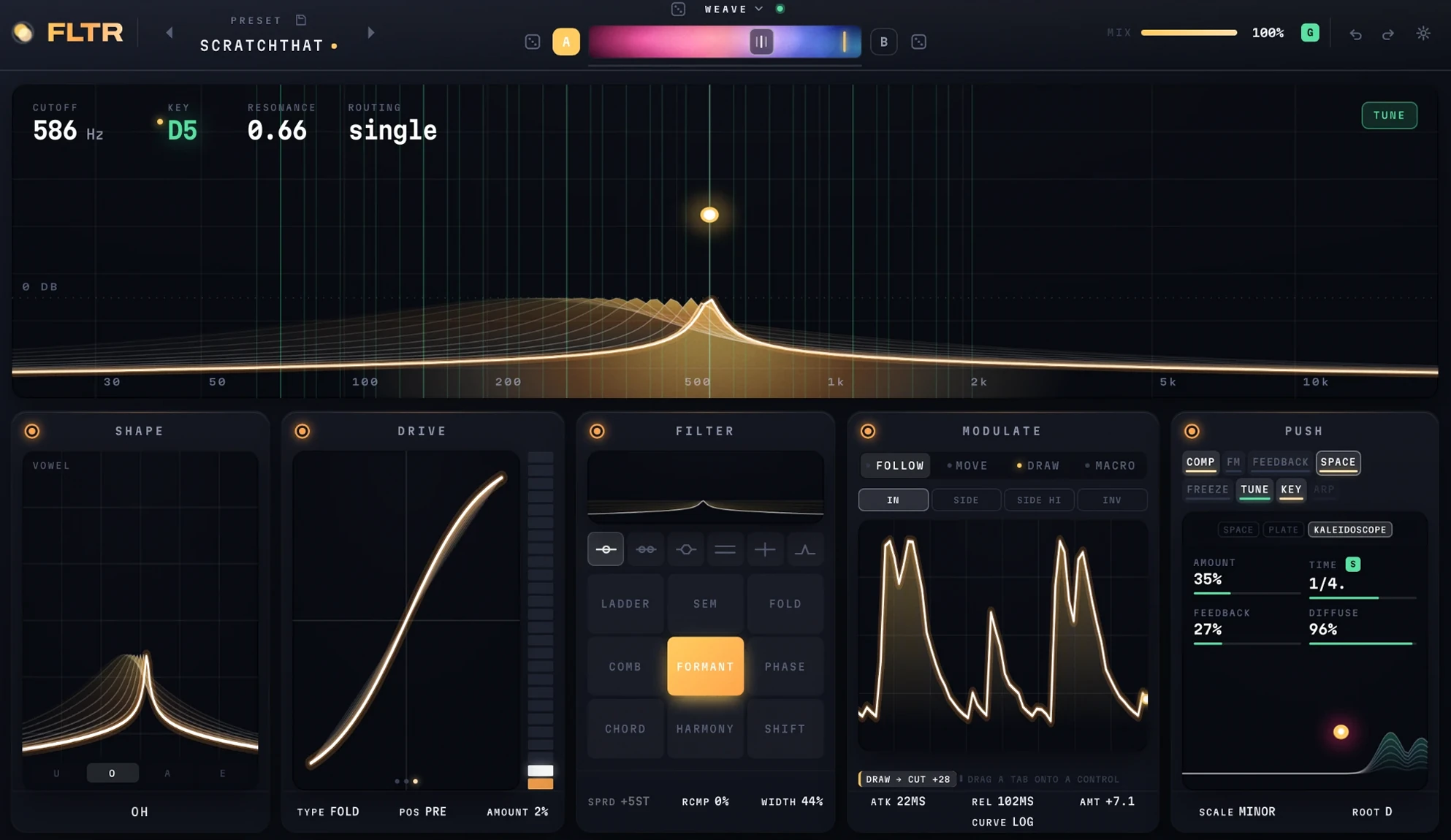
FORMANTa filter that speaks in vowelsclicksee the panel with formant running
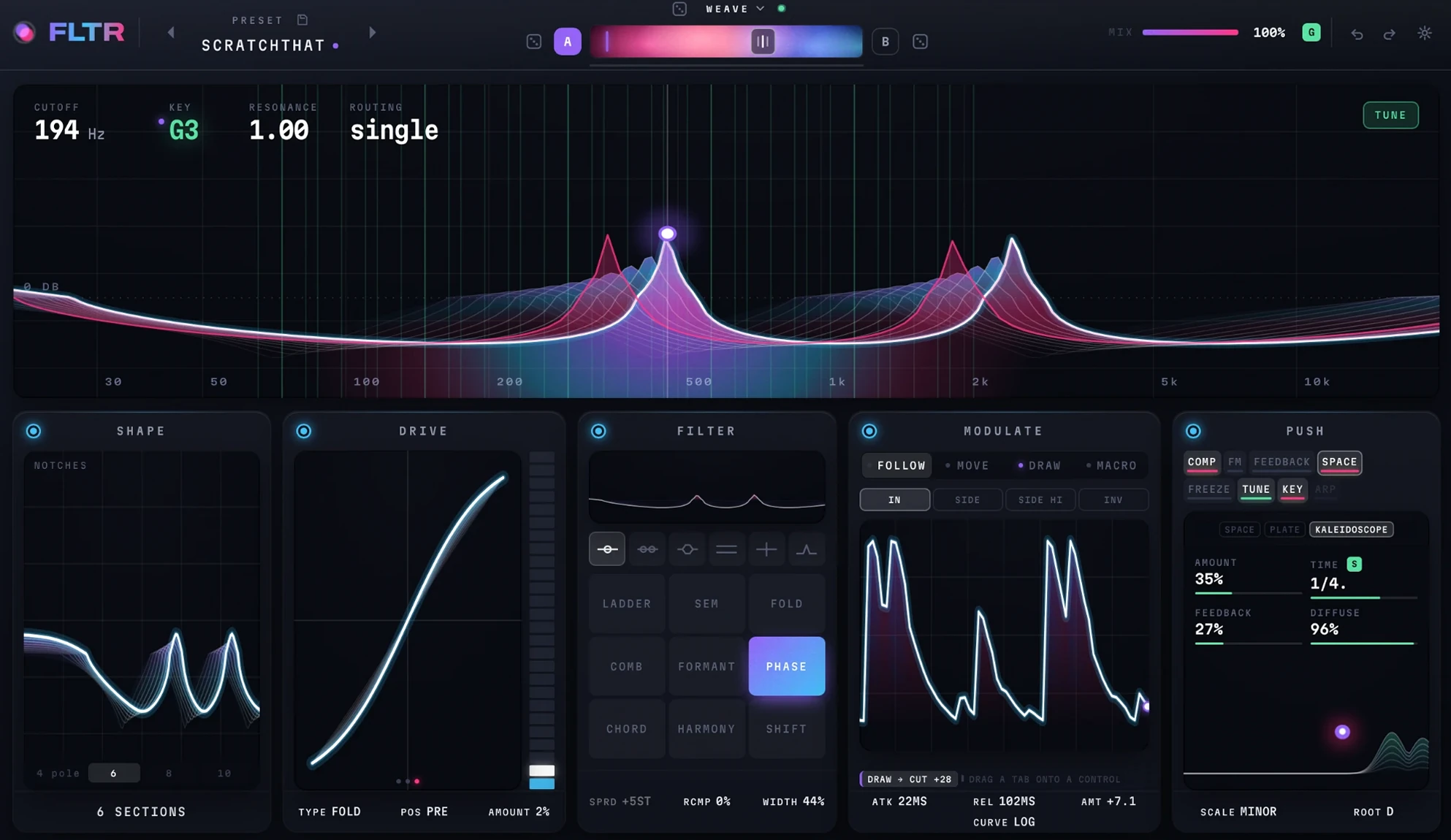
PHASEa phaser, from four sections to twelveclicksee the panel with the phaser running
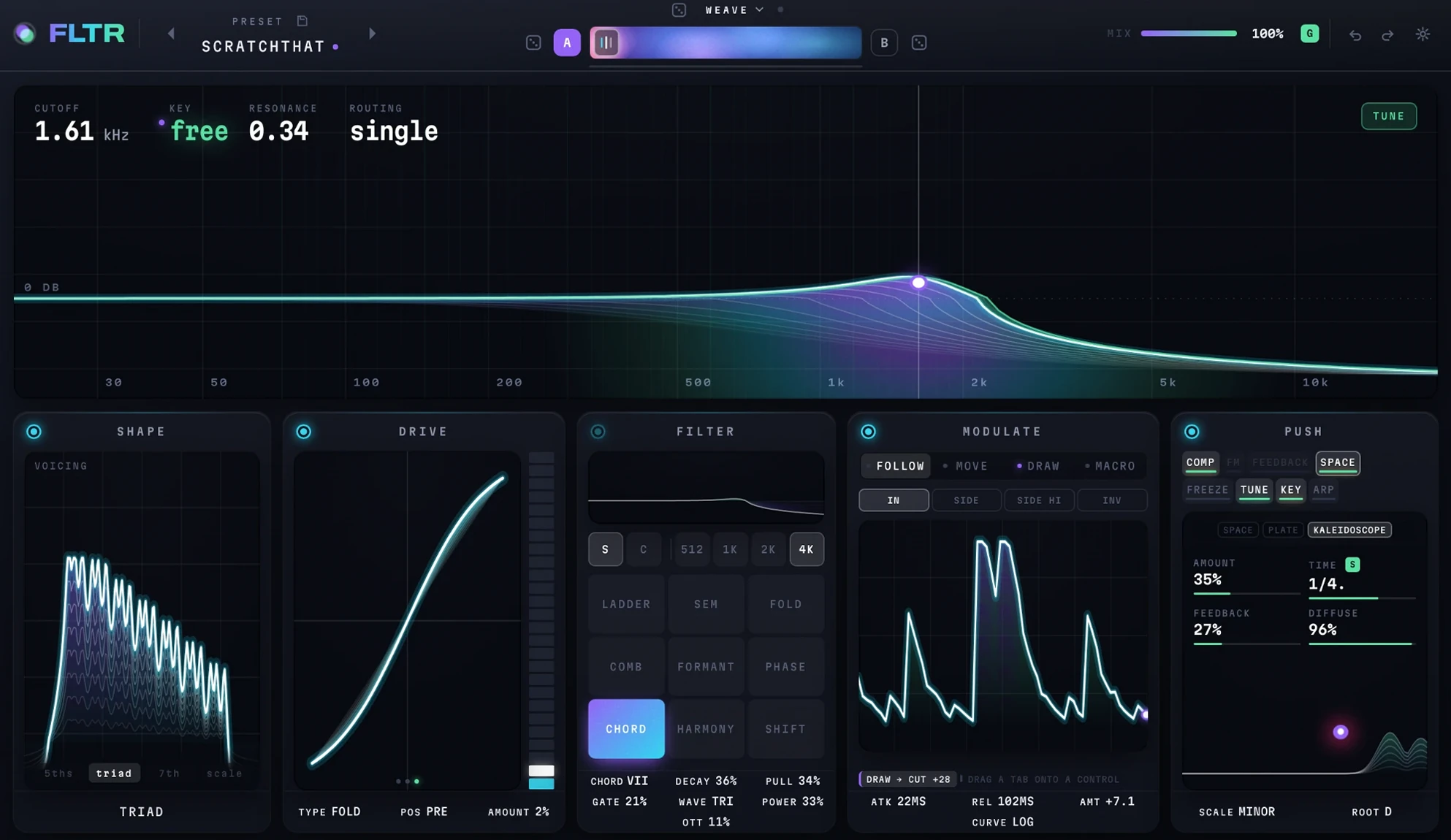
CHORDsnaps what passes through onto the notes of a chord in your keyclicksee the panel with chord running
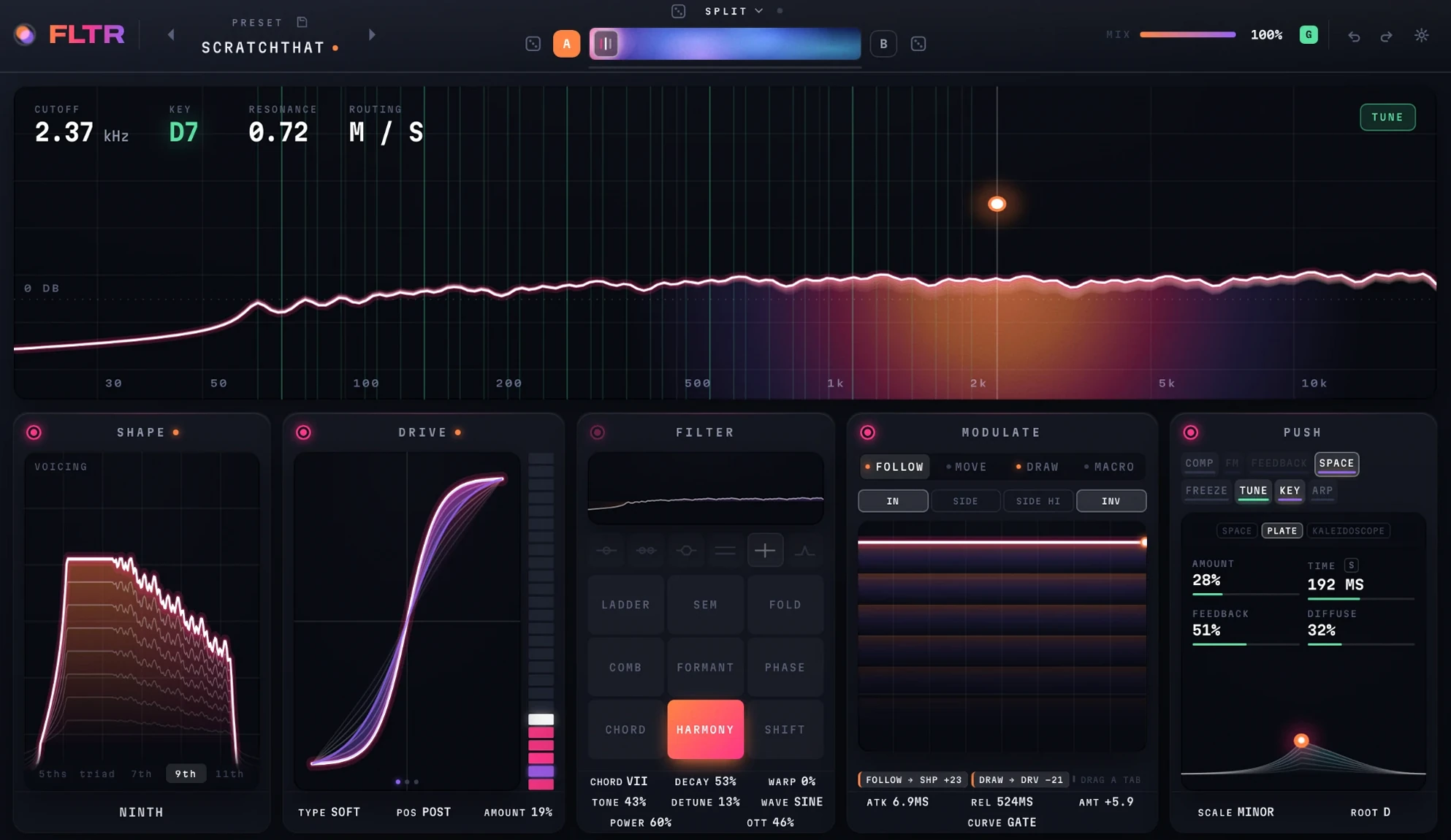
HARMONYrings a chord in your key through a bank of resonatorsclicksee the panel with harmony running
SHIFTa frequency shifterclicksee the panel with the shifter running
SPREADsets the second core apart from the first, up to two octaves either way
RES COMPgives back the bass that resonance takes awaytrymost of what reads as a thin resonance is the low end going missing
WIDTHpulls the left ear's filter up and the right one's down, so each hears its own peak
MODULATE ONstops all four sources and starts them again
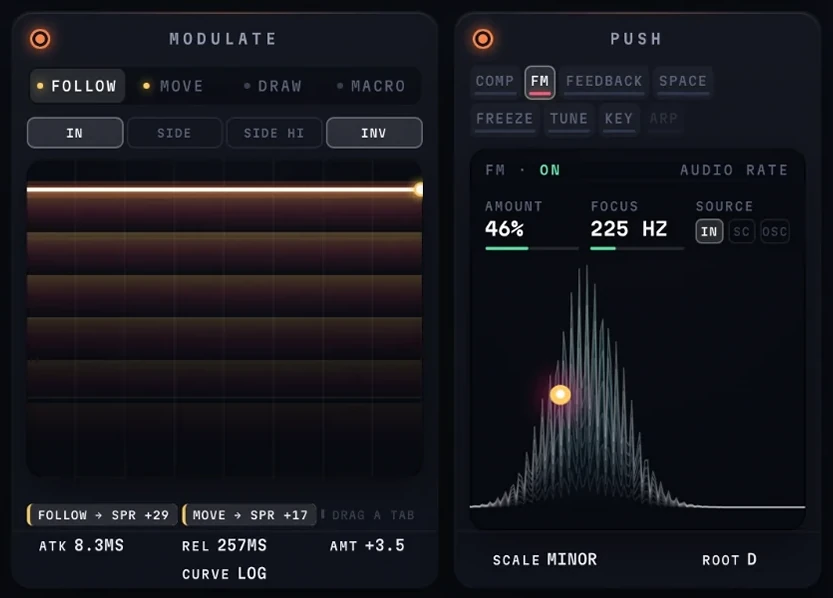
FOLLOWan envelope follower - the level of the sound moves the controltrydrag the tab onto anything; a chip appears there with the depth
MOVEan LFO, free or in time - sine, triangle, saw, square, random or sample and hold
DRAWa sequence you draw, 32 steps, that follows the playheadtrythe same bar sounds the same on every pass
MACROone hand control, routed to as many places as you like
LISTEN TOwhat follow hears - the input, the sidechain, or the sidechain with its low end taken out
INVERTloud closes what it used to open
SOURCEwhat the source is doing right now, not what it is set to
ROUTESevery place this source is going, and how fartrydrag a chip sideways to change its depth
ATTACKhow fast follow rises with the sound
RELEASEhow slowly it falls backtrya fast attack with a long release is what a follower is for
AMOUNTgain into the follower, 24 dB either way
CURVEthe shape of its response - linear, log or gate
PUSH ONswitches the whole push layer off and on
COMPan opto compressor after the filter - it catches a resonant peak without pumping the rest
FMthe cutoff modulated at audio ratetryfocus low for musical sidebands, high for the metallic version
FEEDBACKthe output back into the filter, through a short delay and a saturatortrycomb rings, spiral climbs or falls for ever, bloom blurs into a wash
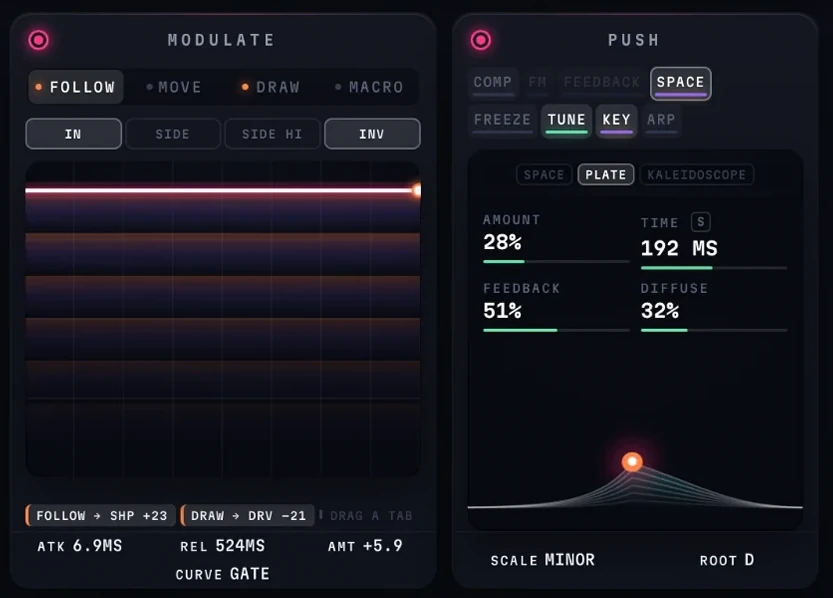
SPACEecho and reverb on top of the sound, in three models
FREEZEholds the spectrum and plays it back as a dronetrychop gates it in time, each step a different slice of what was caught
TUNEsnaps the cutoff to a scale, and can follow MIDI
KEYheld MIDI notes become the cutoff's pitch - two voices where a core is free
ARPchord and harmony play the chord one note at a time, in time with the track
AMOUNThow far the source swings the cutoff
FOCUSwhich band of the source drives ittrylow for the fundamental, high for cymbals
SOURCEthe input, the sidechain, or an oscillator of its own
FMthe modulation, drawn as it happenstrydrag the dot - up for amount, across for focus
THE PADdrag the dot - across for cutoff, up for resonancetrythe bright curve is what you hear; the ghost behind it is what you set
CUTOFFwhere the filter sitstrymodulation on it is measured in semitones, so a depth is the same distance anywhere
KEYthe note the filter is ringing on - free until tune is on and resonance is past half
RESONANCEhow hard the filter rings at the cutofftrypast half, with tune on, the ring is a note in your scale
ROUTINGhow the cores are wired, and how many are running
TUNEsnaps the cutoff to the nearest note of the scaletrysweep the filter and it plays in key
PREVIOUS PRESETsteps back to the preset before this one
PRESETthe name opens the browser - search, folders, save and save astrypresets are plain files in a folder, so they can be moved and shared
SAVEsaves the sound as it stands
NEXT PRESETsteps on to the next preset
ROLLrandomises both sides and the morph type at oncetrythe dice beside A and B roll one side and leave the other
MORPH TYPEhow A becomes B - blend, morph, follow, weave, random or splittrysplit puts A below a crossover and B above it
ROLL Arandomises side A and leaves B as it is
Aone of two complete sounds - click to edit this onetryright-click the bar to copy one side to the other, or swap them
MORPHslides from sound A to sound Btrydrop a modulation tab on it and the morph moves by itself
Bthe second sound, with its own character and settings
ROLL Brandomises side B and leaves A as it is
MIXthe dry signal against the filtered onetrya modulation tab can be dropped here too
GLOBAL MIXone mix for A and B - off, each side keeps its own
UNDOtakes back the last change
REDOputs it back
SETTINGSquality, output trim and auto-gain - the housekeeping, kept off the panel
SHAPE ONtakes shape out of the path and puts it back
SHAPEthe SEM's own mode control - low to notch to high, with band closing the circletrytwo poles all the way round, so the slope never changes
LOW, NOTCH, HIGH, BANDjumps shape straight to one of the four
SHAPE NAMEwhere shape is sitting, in words
DRIVE ONtakes drive out of the path and puts it back
DRIVEthe saturation curve - what comes out, against what went intryauto-gain holds the level, so more drive is more colour and not more volume
DRIVE LEVELa meter you can drag - it sets the amount
TYPEsoft, transistor or fold
POSITIONdrive before the filter, or after ittrybefore, the filter smooths the grit; after, the grit is what you hear
AMOUNThow hard the signal is pushed into the curve
FILTER ONtakes the filter out of the path and puts it back
STAGESthe curve of each core on its own, before they are combined
ROUTINGsingle, series, parallel, split left and right, split mid and side, or three bandtrysingle runs one core, which is why spread is struck through below
LADDERa Moog-style ladderclicksee the panel with a ladder running
SEMtwo poles throughout, so the slope never changes
FOLDa filter whose resonance folds back on itselfclicksee the panel with fold running
COMBa tuned comb - it rings at the cutoff's pitchclicksee the panel with the comb running
FORMANTa filter that speaks in vowelsclicksee the panel with formant running
PHASEa phaser, from four sections to twelveclicksee the panel with the phaser running
CHORDsnaps what passes through onto the notes of a chord in your keyclicksee the panel with chord running
HARMONYrings a chord in your key through a bank of resonatorsclicksee the panel with harmony running
SHIFTa frequency shifterclicksee the panel with the shifter running
SPREADsets the second core apart from the first, up to two octaves either waytrystruck through here - single routing has no second core
RES COMPgives back the bass that resonance takes awaytrymost of what reads as a thin resonance is the low end going missing
WIDTHpulls the left ear's filter up and the right one's down, so each hears its own peak
MODULATE ONstops all four sources and starts them again
FOLLOWan envelope follower - the level of the sound moves the controltrydrag the tab onto anything; a chip appears there with the depth
MOVEan LFO, free or in time - sine, triangle, saw, square, random or sample and hold
DRAWa sequence you draw, 32 steps, that follows the playheadtrythe same bar sounds the same on every pass
MACROone hand control, routed to as many places as you like
LISTEN TOwhat follow hears - the input, the sidechain, or the sidechain with its low end taken out
INVERTloud closes what it used to open
SOURCEwhat the source is doing right now, not what it is set to
ROUTESevery place this source is going, and how fartrydrag a chip sideways to change its depth
ATTACKhow fast follow rises with the sound
RELEASEhow slowly it falls backtrya fast attack with a long release is what a follower is for
AMOUNTgain into the follower, 24 dB either way
CURVEthe shape of its response - linear, log or gate
PUSH ONswitches the whole push layer off and on
COMPan opto compressor after the filter - it catches a resonant peak without pumping the rest
FMthe cutoff modulated at audio ratetryfocus low for musical sidebands, high for the metallic version
FEEDBACKthe output back into the filter, through a short delay and a saturatortrycomb rings, spiral climbs or falls for ever, bloom blurs into a wash
SPACEecho and reverb on top of the sound, in three models
FREEZEholds the spectrum and plays it back as a dronetrychop gates it in time, each step a different slice of what was caught
TUNEsnaps the cutoff to a scale, and can follow MIDI
KEYheld MIDI notes become the cutoff's pitch - two voices where a core is free
ARPchord and harmony play the chord one note at a time, in time with the track
AMOUNThow far the modulator swings the cutoff
RATIOthe modulator's pitch against the filter's own notetrywhole ratios stay in tune with it
SOURCEthe input, the sidechain, a free oscillator, or one held to the ratio
FMthe modulation, drawn as it happenstrydrag the dot - up for amount, across for ratio
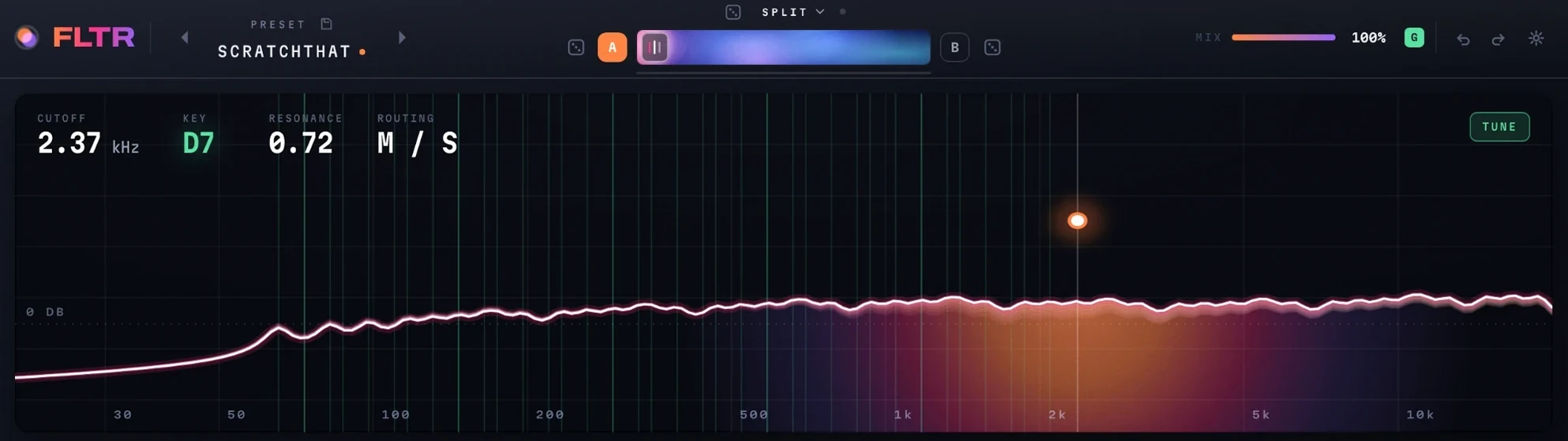
THE PADdrag the dot - across for cutoff, up for resonancetrythe bright curve is what you hear; the ghost behind it is what you set
CUTOFFwhere the filter sitstrymodulation on it is measured in semitones, so a depth is the same distance anywhere
KEYthe note the filter is ringing on - free until tune is on and resonance is past half
RESONANCEhow hard the filter rings at the cutofftrypast half, with tune on, the ring is a note in your scale
ROUTINGhow the cores are wired, and how many are running
TUNEsnaps the cutoff to the nearest note of the scaletrysweep the filter and it plays in key
PREVIOUS PRESETsteps back to the preset before this one
PRESETthe name opens the browser - search, folders, save and save astrypresets are plain files in a folder, so they can be moved and shared
SAVEsaves the sound as it stands
NEXT PRESETsteps on to the next preset
ROLLrandomises both sides and the morph type at oncetrythe dice beside A and B roll one side and leave the other
MORPH TYPEhow A becomes B - blend, morph, follow, weave, random or splittrysplit puts A below a crossover and B above it
ROLL Arandomises side A and leaves B as it is
Aone of two complete sounds - click to edit this onetryright-click the bar to copy one side to the other, or swap them
MORPHslides from sound A to sound Btrydrop a modulation tab on it and the morph moves by itself
Bthe second sound, with its own character and settings
ROLL Brandomises side B and leaves A as it is
MIXthe dry signal against the filtered onetrya modulation tab can be dropped here too
GLOBAL MIXone mix for A and B - off, each side keeps its own
UNDOtakes back the last change
REDOputs it back
SETTINGSquality, output trim and auto-gain - the housekeeping, kept off the panel
SHAPE ONtakes shape out of the path and puts it back
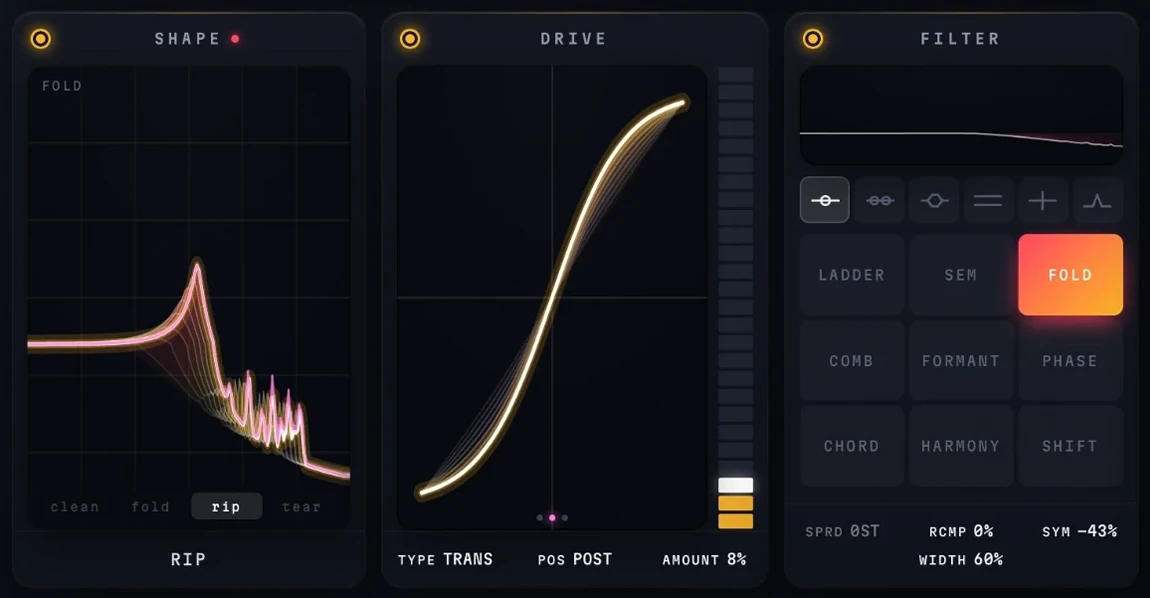
FOLDhow many times the resonance folds back on itselftrythe harmonics grow out of the peak, not out of the signal
CLEAN, FOLD, RIP, TEARthe four places where the sound changes character
SHAPE NAMEwhere shape is sitting, in words
DRIVE ONtakes drive out of the path and puts it back
DRIVEthe saturation curve - what comes out, against what went intryauto-gain holds the level, so more drive is more colour and not more volume
DRIVE LEVELa meter you can drag - it sets the amount
TYPEsoft, transistor or fold
POSITIONdrive before the filter, or after ittrybefore, the filter smooths the grit; after, the grit is what you hear
AMOUNThow hard the signal is pushed into the curve
FILTER ONtakes the filter out of the path and puts it back
STAGESthe curve of each core on its own, before they are combined
ROUTINGsingle, series, parallel, split left and right, split mid and side, or three bandtrysingle runs one core, which is why spread is struck through below
LADDERa Moog-style ladderclicksee the panel with a ladder running
SEMtwo poles throughout, so the slope never changesclicksee the panel with the sem running
FOLDa filter whose resonance folds back on itself
COMBa tuned comb - it rings at the cutoff's pitchclicksee the panel with the comb running
FORMANTa filter that speaks in vowelsclicksee the panel with formant running
PHASEa phaser, from four sections to twelveclicksee the panel with the phaser running
CHORDsnaps what passes through onto the notes of a chord in your keyclicksee the panel with chord running
HARMONYrings a chord in your key through a bank of resonatorsclicksee the panel with harmony running
SHIFTa frequency shifterclicksee the panel with the shifter running
SPREADsets the second core apart from the first, up to two octaves either waytrystruck through here - single routing has no second core
RES COMPgives back the bass that resonance takes awaytrymost of what reads as a thin resonance is the low end going missing
SYMMETRYthe folder's bias, which is where the even harmonics come from
WIDTHpulls the left ear's filter up and the right one's down, so each hears its own peak
MODULATE ONstops all four sources and starts them again
FOLLOWan envelope follower - the level of the sound moves the controltrydrag the tab onto anything; a chip appears there with the depth
MOVEan LFO, free or in time - sine, triangle, saw, square, random or sample and hold
DRAWa sequence you draw, 32 steps, that follows the playheadtrythe same bar sounds the same on every pass
MACROone hand control, routed to as many places as you like
LISTEN TOwhat follow hears - the input, the sidechain, or the sidechain with its low end taken out
INVERTloud closes what it used to open
SOURCEwhat the source is doing right now, not what it is set to
ROUTESevery place this source is going, and how fartrydrag a chip sideways to change its depth
ATTACKhow fast follow rises with the sound
RELEASEhow slowly it falls backtrya fast attack with a long release is what a follower is for
AMOUNTgain into the follower, 24 dB either way
CURVEthe shape of its response - linear, log or gate
PUSH ONswitches the whole push layer off and on
COMPan opto compressor after the filter - it catches a resonant peak without pumping the rest
FMthe cutoff modulated at audio ratetryfocus low for musical sidebands, high for the metallic version
FEEDBACKthe output back into the filter, through a short delay and a saturatortrycomb rings, spiral climbs or falls for ever, bloom blurs into a wash
SPACEecho and reverb on top of the sound, in three models
FREEZEholds the spectrum and plays it back as a dronetrychop gates it in time, each step a different slice of what was caught
TUNEsnaps the cutoff to a scale, and can follow MIDI
KEYheld MIDI notes become the cutoff's pitch - two voices where a core is free
ARPchord and harmony play the chord one note at a time, in time with the track
STRENGTHhow firmly the cutoff is pulled to the notetryshort of full, it leans in key without locking
GLIDEhow long it takes to slide from one note to the next
ROOTthe key the scale is built on
LIMIT LOa floor under where the cutoff can sit
LIMIT HIa ceiling over it
MIDIon, tune follows the notes you play
KEYBOARDthe notes in the scale, lit - click one to take it out or put it in
THE PADdrag the dot - across for cutoff, up for resonancetrythe bright curve is what you hear; the ghost behind it is what you set
CUTOFFwhere the filter sitstrymodulation on it is measured in semitones, so a depth is the same distance anywhere
KEYthe note the filter is ringing on - free until tune is on and resonance is past half
RESONANCEhow hard the filter rings at the cutofftrypast half, with tune on, the ring is a note in your scale
ROUTINGhow the cores are wired, and how many are running
TUNEsnaps the cutoff to the nearest note of the scaletrysweep the filter and it plays in key
PREVIOUS PRESETsteps back to the preset before this one
PRESETthe name opens the browser - search, folders, save and save astrypresets are plain files in a folder, so they can be moved and shared
SAVEsaves the sound as it stands
NEXT PRESETsteps on to the next preset
ROLLrandomises both sides and the morph type at oncetrythe dice beside A and B roll one side and leave the other
MORPH TYPEhow A becomes B - blend, morph, follow, weave, random or splittrysplit puts A below a crossover and B above it
ROLL Arandomises side A and leaves B as it is
Aone of two complete sounds - click to edit this onetryright-click the bar to copy one side to the other, or swap them
MORPHslides from sound A to sound Btrydrop a modulation tab on it and the morph moves by itself
Bthe second sound, with its own character and settings
ROLL Brandomises side B and leaves A as it is
MIXthe dry signal against the filtered onetrya modulation tab can be dropped here too
GLOBAL MIXone mix for A and B - off, each side keeps its own
UNDOtakes back the last change
REDOputs it back
SETTINGSquality, output trim and auto-gain - the housekeeping, kept off the panel
SHAPE ONtakes shape out of the path and puts it back
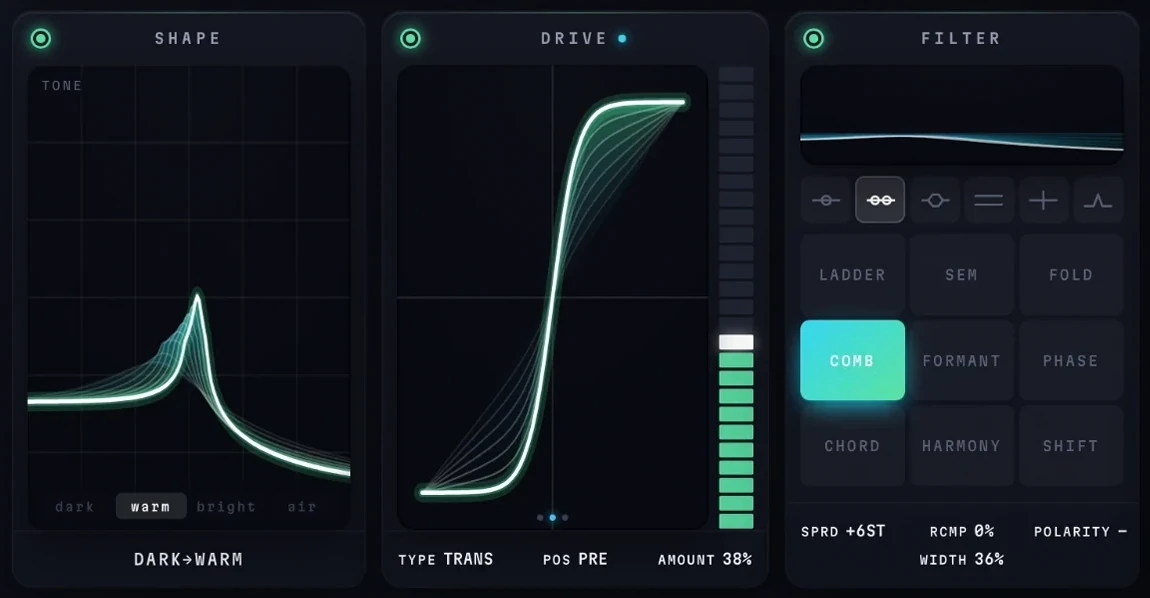
TONEthe comb's tone, from dark through warm and bright to air
DARK, WARM, BRIGHT, AIRjumps tone straight to one of the four
SHAPE NAMEwhere shape is sitting, in words
DRIVE ONtakes drive out of the path and puts it back
DRIVEthe saturation curve - what comes out, against what went intryauto-gain holds the level, so more drive is more colour and not more volume
DRIVE LEVELa meter you can drag - it sets the amount
TYPEsoft, transistor or fold
POSITIONdrive before the filter, or after ittrybefore, the filter smooths the grit; after, the grit is what you hear
AMOUNThow hard the signal is pushed into the curve
FILTER ONtakes the filter out of the path and puts it back
STAGESthe curve of each core on its own, before they are combined
ROUTINGsingle, series, parallel, split left and right, split mid and side, or three bandtrysingle runs one core, which is why spread is struck through below
LADDERa Moog-style ladderclicksee the panel with a ladder running
SEMtwo poles throughout, so the slope never changesclicksee the panel with the sem running
FOLDa filter whose resonance folds back on itselfclicksee the panel with fold running
COMBa tuned comb - it rings at the cutoff's pitch
FORMANTa filter that speaks in vowelsclicksee the panel with formant running
PHASEa phaser, from four sections to twelveclicksee the panel with the phaser running
CHORDsnaps what passes through onto the notes of a chord in your keyclicksee the panel with chord running
HARMONYrings a chord in your key through a bank of resonatorsclicksee the panel with harmony running
SHIFTa frequency shifterclicksee the panel with the shifter running
SPREADsets the second core apart from the first, up to two octaves either waytrystruck through here - single routing has no second core
RES COMPgives back the bass that resonance takes awaytrymost of what reads as a thin resonance is the low end going missing
POLARITYthe sign of the comb's feedbacktryminus cancels the even harmonics - an octave down, and hollow
WIDTHpulls the left ear's filter up and the right one's down, so each hears its own peak
MODULATE ONstops all four sources and starts them again
FOLLOWan envelope follower - the level of the sound moves the controltrydrag the tab onto anything; a chip appears there with the depth
MOVEan LFO, free or in time - sine, triangle, saw, square, random or sample and hold
DRAWa sequence you draw, 32 steps, that follows the playheadtrythe same bar sounds the same on every pass
MACROone hand control, routed to as many places as you like
LISTEN TOwhat follow hears - the input, the sidechain, or the sidechain with its low end taken out
INVERTloud closes what it used to open
SOURCEwhat the source is doing right now, not what it is set to
ROUTESevery place this source is going, and how fartrydrag a chip sideways to change its depth
ATTACKhow fast follow rises with the sound
RELEASEhow slowly it falls backtrya fast attack with a long release is what a follower is for
AMOUNTgain into the follower, 24 dB either way
CURVEthe shape of its response - linear, log or gate
PUSH ONswitches the whole push layer off and on
COMPan opto compressor after the filter - it catches a resonant peak without pumping the rest
FMthe cutoff modulated at audio ratetryfocus low for musical sidebands, high for the metallic version
FEEDBACKthe output back into the filter, through a short delay and a saturatortrycomb rings, spiral climbs or falls for ever, bloom blurs into a wash
SPACEecho and reverb on top of the sound, in three models
FREEZEholds the spectrum and plays it back as a dronetrychop gates it in time, each step a different slice of what was caught
TUNEsnaps the cutoff to a scale, and can follow MIDI
KEYheld MIDI notes become the cutoff's pitch - two voices where a core is free
ARPchord and harmony play the chord one note at a time, in time with the track
AMOUNThow far the modulator swings the cutoff
RATIOthe modulator's pitch against the filter's own notetrywhole ratios stay in tune with it
SOURCEthe input, the sidechain, a free oscillator, or one held to the ratio
FMthe modulation, drawn as it happenstrydrag the dot - up for amount, across for ratio
THE PADdrag the dot - across for cutoff, up for resonancetrythe bright curve is what you hear; the ghost behind it is what you set
CUTOFFwhere the filter sitstrymodulation on it is measured in semitones, so a depth is the same distance anywhere
KEYthe note the filter is ringing on - free until tune is on and resonance is past half
RESONANCEhow hard the filter rings at the cutofftrypast half, with tune on, the ring is a note in your scale
ROUTINGhow the cores are wired, and how many are running
TUNEsnaps the cutoff to the nearest note of the scaletrysweep the filter and it plays in key
PREVIOUS PRESETsteps back to the preset before this one
PRESETthe name opens the browser - search, folders, save and save astrypresets are plain files in a folder, so they can be moved and shared
SAVEsaves the sound as it stands
NEXT PRESETsteps on to the next preset
ROLLrandomises both sides and the morph type at oncetrythe dice beside A and B roll one side and leave the other
MORPH TYPEhow A becomes B - blend, morph, follow, weave, random or splittrysplit puts A below a crossover and B above it
ROLL Arandomises side A and leaves B as it is
Aone of two complete sounds - click to edit this onetryright-click the bar to copy one side to the other, or swap them
MORPHslides from sound A to sound Btrydrop a modulation tab on it and the morph moves by itself
Bthe second sound, with its own character and settings
ROLL Brandomises side B and leaves A as it is
MIXthe dry signal against the filtered onetrya modulation tab can be dropped here too
GLOBAL MIXone mix for A and B - off, each side keeps its own
UNDOtakes back the last change
REDOputs it back
SETTINGSquality, output trim and auto-gain - the housekeeping, kept off the panel
SHAPE ONtakes shape out of the path and puts it back
VOWELwalks the vowels - oo, oh, ah, eh, eetryback of the mouth to the front, with no cliff on the way
U, O, A, Ejumps straight to a vowel
SHAPE NAMEwhere shape is sitting, in words
DRIVE ONtakes drive out of the path and puts it back
DRIVEthe saturation curve - what comes out, against what went intryauto-gain holds the level, so more drive is more colour and not more volume
DRIVE LEVELa meter you can drag - it sets the amount
TYPEsoft, transistor or fold
POSITIONdrive before the filter, or after ittrybefore, the filter smooths the grit; after, the grit is what you hear
AMOUNThow hard the signal is pushed into the curve
FILTER ONtakes the filter out of the path and puts it back
STAGESthe curve of each core on its own, before they are combined
ROUTINGsingle, series, parallel, split left and right, split mid and side, or three bandtrysingle runs one core
LADDERa Moog-style ladderclicksee the panel with a ladder running
SEMtwo poles throughout, so the slope never changesclicksee the panel with the sem running
FOLDa filter whose resonance folds back on itselfclicksee the panel with fold running
COMBa tuned comb - it rings at the cutoff's pitchclicksee the panel with the comb running
FORMANTa filter that speaks in vowels
PHASEa phaser, from four sections to twelveclicksee the panel with the phaser running
CHORDsnaps what passes through onto the notes of a chord in your keyclicksee the panel with chord running
HARMONYrings a chord in your key through a bank of resonatorsclicksee the panel with harmony running
SHIFTa frequency shifterclicksee the panel with the shifter running
SPREADsets the second core apart from the first, up to two octaves either way
RES COMPgives back the bass that resonance takes awaytrymost of what reads as a thin resonance is the low end going missing
WIDTHpulls the left ear's filter up and the right one's down, so each hears its own peak
MODULATE ONstops all four sources and starts them again
FOLLOWan envelope follower - the level of the sound moves the controltrydrag the tab onto anything; a chip appears there with the depth
MOVEan LFO, free or in time - sine, triangle, saw, square, random or sample and hold
DRAWa sequence you draw, 32 steps, that follows the playheadtrythe same bar sounds the same on every pass
MACROone hand control, routed to as many places as you like
LISTEN TOwhat follow hears - the input, the sidechain, or the sidechain with its low end taken out
INVERTloud closes what it used to open
SOURCEwhat the source is doing right now, not what it is set to
ROUTESevery place this source is going, and how fartrydrag a chip sideways to change its depth
ATTACKhow fast follow rises with the sound
RELEASEhow slowly it falls backtrya fast attack with a long release is what a follower is for
AMOUNTgain into the follower, 24 dB either way
CURVEthe shape of its response - linear, log or gate
PUSH ONswitches the whole push layer off and on
COMPan opto compressor after the filter - it catches a resonant peak without pumping the rest
FMthe cutoff modulated at audio ratetryfocus low for musical sidebands, high for the metallic version
FEEDBACKthe output back into the filter, through a short delay and a saturatortrycomb rings, spiral climbs or falls for ever, bloom blurs into a wash
SPACEecho and reverb on top of the sound, in three models
FREEZEholds the spectrum and plays it back as a dronetrychop gates it in time, each step a different slice of what was caught
TUNEsnaps the cutoff to a scale, and can follow MIDI
KEYheld MIDI notes become the cutoff's pitch - two voices where a core is free
ARPchord and harmony play the chord one note at a time, in time with the track
MODELspace, plate or kaleidoscope - this is kaleidoscopetrykaleidoscope is a cascade of echoes that speeds up, each a different colour
AMOUNThow much of it is added on top
TIMEthe first echo - here a dotted quarter, locked to the track by S
FEEDBACKhow many times it cascades again
DIFFUSEfrom crisp to a wash
SPACEthe tail as it ringstrydrag the dot - up for amount, across for time
THE PADdrag the dot - across for cutoff, up for resonancetrythe bright curve is what you hear; the ghost behind it is what you set
CUTOFFwhere the filter sitstrymodulation on it is measured in semitones, so a depth is the same distance anywhere
KEYthe note the filter is ringing on - free until tune is on and resonance is past half
RESONANCEhow hard the filter rings at the cutofftrypast half, with tune on, the ring is a note in your scale
ROUTINGhow the cores are wired, and how many are running
TUNEsnaps the cutoff to the nearest note of the scaletrysweep the filter and it plays in key
PREVIOUS PRESETsteps back to the preset before this one
PRESETthe name opens the browser - search, folders, save and save astrypresets are plain files in a folder, so they can be moved and shared
SAVEsaves the sound as it stands
NEXT PRESETsteps on to the next preset
ROLLrandomises both sides and the morph type at oncetrythe dice beside A and B roll one side and leave the other
MORPH TYPEhow A becomes B - blend, morph, follow, weave, random or splittrysplit puts A below a crossover and B above it
ROLL Arandomises side A and leaves B as it is
Aone of two complete sounds - click to edit this onetryright-click the bar to copy one side to the other, or swap them
MORPHslides from sound A to sound Btrydrop a modulation tab on it and the morph moves by itself
Bthe second sound, with its own character and settings
ROLL Brandomises side B and leaves A as it is
MIXthe dry signal against the filtered onetrya modulation tab can be dropped here too
GLOBAL MIXone mix for A and B - off, each side keeps its own
UNDOtakes back the last change
REDOputs it back
SETTINGSquality, output trim and auto-gain - the housekeeping, kept off the panel
SHAPE ONtakes shape out of the path and puts it back
NOTCHEShow many all-pass sections are in the chain, from 4 to 12tryit is the density of the notches, not a filter mode
4 POLE, 6, 8, 10jumps straight to a number of sections
SHAPE NAMEwhere shape is sitting, in words
DRIVE ONtakes drive out of the path and puts it back
DRIVEthe saturation curve - what comes out, against what went intryauto-gain holds the level, so more drive is more colour and not more volume
DRIVE LEVELa meter you can drag - it sets the amount
TYPEsoft, transistor or fold
POSITIONdrive before the filter, or after ittrybefore, the filter smooths the grit; after, the grit is what you hear
AMOUNThow hard the signal is pushed into the curve
FILTER ONtakes the filter out of the path and puts it back
STAGESthe curve of each core on its own, before they are combined
ROUTINGsingle, series, parallel, split left and right, split mid and side, or three bandtrysingle runs one core
LADDERa Moog-style ladderclicksee the panel with a ladder running
SEMtwo poles throughout, so the slope never changesclicksee the panel with the sem running
FOLDa filter whose resonance folds back on itselfclicksee the panel with fold running
COMBa tuned comb - it rings at the cutoff's pitchclicksee the panel with the comb running
FORMANTa filter that speaks in vowelsclicksee the panel with formant running
PHASEa phaser, from four sections to twelve
CHORDsnaps what passes through onto the notes of a chord in your keyclicksee the panel with chord running
HARMONYrings a chord in your key through a bank of resonatorsclicksee the panel with harmony running
SHIFTa frequency shifterclicksee the panel with the shifter running
SPREADsets the second core apart from the first, up to two octaves either way
RES COMPgives back the bass that resonance takes awaytrymost of what reads as a thin resonance is the low end going missing
WIDTHpulls the left ear's filter up and the right one's down, so each hears its own peak
MODULATE ONstops all four sources and starts them again
FOLLOWan envelope follower - the level of the sound moves the controltrydrag the tab onto anything; a chip appears there with the depth
MOVEan LFO, free or in time - sine, triangle, saw, square, random or sample and hold
DRAWa sequence you draw, 32 steps, that follows the playheadtrythe same bar sounds the same on every pass
MACROone hand control, routed to as many places as you like
LISTEN TOwhat follow hears - the input, the sidechain, or the sidechain with its low end taken out
INVERTloud closes what it used to open
SOURCEwhat the source is doing right now, not what it is set to
ROUTESevery place this source is going, and how fartrydrag a chip sideways to change its depth
ATTACKhow fast follow rises with the sound
RELEASEhow slowly it falls backtrya fast attack with a long release is what a follower is for
AMOUNTgain into the follower, 24 dB either way
CURVEthe shape of its response - linear, log or gate
PUSH ONswitches the whole push layer off and on
COMPan opto compressor after the filter - it catches a resonant peak without pumping the rest
FMthe cutoff modulated at audio ratetryfocus low for musical sidebands, high for the metallic version
FEEDBACKthe output back into the filter, through a short delay and a saturatortrycomb rings, spiral climbs or falls for ever, bloom blurs into a wash
SPACEecho and reverb on top of the sound, in three models
FREEZEholds the spectrum and plays it back as a dronetrychop gates it in time, each step a different slice of what was caught
TUNEsnaps the cutoff to a scale, and can follow MIDI
KEYheld MIDI notes become the cutoff's pitch - two voices where a core is free
ARPchord and harmony play the chord one note at a time, in time with the track
MODELspace, plate or kaleidoscope - this is kaleidoscopetrykaleidoscope is a cascade of echoes that speeds up, each a different colour
AMOUNThow much of it is added on top
TIMEthe first echo - here a dotted quarter, locked to the track by S
FEEDBACKhow many times it cascades again
DIFFUSEfrom crisp to a wash
SPACEthe tail as it ringstrydrag the dot - up for amount, across for time
THE PADdrag the dot - across for cutoff, up for resonancetrythe bright curve is what you hear; the ghost behind it is what you set
CUTOFFwhere the filter sitstrymodulation on it is measured in semitones, so a depth is the same distance anywhere
KEYthe note the filter is ringing on - free until tune is on and resonance is past half
RESONANCEhow hard the filter rings at the cutofftrypast half, with tune on, the ring is a note in your scale
ROUTINGhow the cores are wired, and how many are running
TUNEsnaps the cutoff to the nearest note of the scaletrysweep the filter and it plays in key
PREVIOUS PRESETsteps back to the preset before this one
PRESETthe name opens the browser - search, folders, save and save astrypresets are plain files in a folder, so they can be moved and shared
SAVEsaves the sound as it stands
NEXT PRESETsteps on to the next preset
ROLLrandomises both sides and the morph type at oncetrythe dice beside A and B roll one side and leave the other
MORPH TYPEhow A becomes B - blend, morph, follow, weave, random or splittrysplit puts A below a crossover and B above it
ROLL Arandomises side A and leaves B as it is
Aone of two complete sounds - click to edit this onetryright-click the bar to copy one side to the other, or swap them
MORPHslides from sound A to sound Btrydrop a modulation tab on it and the morph moves by itself
Bthe second sound, with its own character and settings
ROLL Brandomises side B and leaves A as it is
MIXthe dry signal against the filtered onetrya modulation tab can be dropped here too
GLOBAL MIXone mix for A and B - off, each side keeps its own
UNDOtakes back the last change
REDOputs it back
SETTINGSquality, output trim and auto-gain - the housekeeping, kept off the panel
SHAPE ONtakes shape out of the path and puts it back
VOICINGhow many notes the chord has - fifths, a triad, a seventh, or the whole scale
5THS, TRIAD, 7TH, SCALEjumps straight to a voicing
SHAPE NAMEwhere shape is sitting, in words
DRIVE ONtakes drive out of the path and puts it back
DRIVEthe saturation curve - what comes out, against what went intryauto-gain holds the level, so more drive is more colour and not more volume
DRIVE LEVELa meter you can drag - it sets the amount
TYPEsoft, transistor or fold
POSITIONdrive before the filter, or after ittrybefore, the filter smooths the grit; after, the grit is what you hear
AMOUNThow hard the signal is pushed into the curve
FILTER ONtakes the filter out of the path and puts it back
STAGESthe curve of each core on its own, before they are combined
SNAP, CONFORMsnap puts every partial on the scale's own chord; conform roots the chord on the note it hearstryconform follows the part
WINDOW512 to 4096 points - a longer one resolves pitch better and time worsetry4k resolves a bass harmonic series; 512 keeps the transients
LADDERa Moog-style ladderclicksee the panel with a ladder running
SEMtwo poles throughout, so the slope never changesclicksee the panel with the sem running
FOLDa filter whose resonance folds back on itselfclicksee the panel with fold running
COMBa tuned comb - it rings at the cutoff's pitchclicksee the panel with the comb running
FORMANTa filter that speaks in vowelsclicksee the panel with formant running
PHASEa phaser, from four sections to twelveclicksee the panel with the phaser running
CHORDsnaps what passes through onto the notes of a chord in your key
HARMONYrings a chord in your key through a bank of resonatorsclicksee the panel with harmony running
SHIFTa frequency shifterclicksee the panel with the shifter running
CHORDwhich chord of the key, I to VIItrya chord progression is this one field, automated
DECAYhow long the chord rings on
PULLfrom snapping notes onto the chord to bending them towards ittryanything short of full is most of what stops it sounding mechanical
GATEhow loud a partial has to be before it is let through to ring
WAVEthe notes as oscillators - sine, triangle, square or saw
POWERlifts each note's ring against its own peak
OTTsquashes the chord forward in three bands
MODULATE ONstops all four sources and starts them again
FOLLOWan envelope follower - the level of the sound moves the controltrydrag the tab onto anything; a chip appears there with the depth
MOVEan LFO, free or in time - sine, triangle, saw, square, random or sample and hold
DRAWa sequence you draw, 32 steps, that follows the playheadtrythe same bar sounds the same on every pass
MACROone hand control, routed to as many places as you like
LISTEN TOwhat follow hears - the input, the sidechain, or the sidechain with its low end taken out
INVERTloud closes what it used to open
SOURCEwhat the source is doing right now, not what it is set to
ROUTESevery place this source is going, and how fartrydrag a chip sideways to change its depth
ATTACKhow fast follow rises with the sound
RELEASEhow slowly it falls backtrya fast attack with a long release is what a follower is for
AMOUNTgain into the follower, 24 dB either way
CURVEthe shape of its response - linear, log or gate
PUSH ONswitches the whole push layer off and on
COMPan opto compressor after the filter - it catches a resonant peak without pumping the rest
FMthe cutoff modulated at audio ratetryfocus low for musical sidebands, high for the metallic version
FEEDBACKthe output back into the filter, through a short delay and a saturatortrycomb rings, spiral climbs or falls for ever, bloom blurs into a wash
SPACEecho and reverb on top of the sound, in three models
FREEZEholds the spectrum and plays it back as a dronetrychop gates it in time, each step a different slice of what was caught
TUNEsnaps the cutoff to a scale, and can follow MIDI
KEYheld MIDI notes become the cutoff's pitch - two voices where a core is free
ARPchord and harmony play the chord one note at a time, in time with the track
MODELspace, plate or kaleidoscope - this is kaleidoscopetrykaleidoscope is a cascade of echoes that speeds up, each a different colour
AMOUNThow much of it is added on top
TIMEthe first echo - here a dotted quarter, locked to the track by S
FEEDBACKhow many times it cascades again
DIFFUSEfrom crisp to a wash
SPACEthe tail as it ringstrydrag the dot - up for amount, across for time
THE PADdrag the dot - across for cutoff, up for resonancetrythe bright curve is what you hear; the ghost behind it is what you set
CUTOFFwhere the filter sitstrymodulation on it is measured in semitones, so a depth is the same distance anywhere
KEYthe note the filter is ringing on - free until tune is on and resonance is past half
RESONANCEhow hard the filter rings at the cutofftrypast half, with tune on, the ring is a note in your scale
ROUTINGhow the cores are wired, and how many are running
TUNEsnaps the cutoff to the nearest note of the scaletrysweep the filter and it plays in key
PREVIOUS PRESETsteps back to the preset before this one
PRESETthe name opens the browser - search, folders, save and save astrypresets are plain files in a folder, so they can be moved and shared
SAVEsaves the sound as it stands
NEXT PRESETsteps on to the next preset
ROLLrandomises both sides and the morph type at oncetrythe dice beside A and B roll one side and leave the other
MORPH TYPEhow A becomes B - blend, morph, follow, weave, random or splittrysplit puts A below a crossover and B above it
ROLL Arandomises side A and leaves B as it is
Aone of two complete sounds - click to edit this onetryright-click the bar to copy one side to the other, or swap them
MORPHslides from sound A to sound Btrydrop a modulation tab on it and the morph moves by itself
Bthe second sound, with its own character and settings
ROLL Brandomises side B and leaves A as it is
MIXthe dry signal against the filtered onetrya modulation tab can be dropped here too
GLOBAL MIXone mix for A and B - off, each side keeps its own
UNDOtakes back the last change
REDOputs it back
SETTINGSquality, output trim and auto-gain - the housekeeping, kept off the panel
SHAPE ONtakes shape out of the path and puts it back
VOICINGhow many notes the chord has, from bare fifths to an eleventh
5THS, TRIAD, 7TH, 9TH, 11THjumps straight to a voicing
SHAPE NAMEwhere shape is sitting, in words
DRIVE ONtakes drive out of the path and puts it back
DRIVEthe saturation curve - what comes out, against what went intryauto-gain holds the level, so more drive is more colour and not more volume
DRIVE LEVELa meter you can drag - it sets the amount
TYPEsoft, transistor or fold
POSITIONdrive before the filter, or after ittrybefore, the filter smooths the grit; after, the grit is what you hear
AMOUNThow hard the signal is pushed into the curve
FILTER ONtakes the filter out of the path and puts it back
STAGESthe curve of each core on its own, before they are combined
ROUTINGsingle, series, parallel, split left and right, split mid and side, or three bandtrysplit mid and side here - the middle and the edges each get a filter
LADDERa Moog-style ladderclicksee the panel with a ladder running
SEMtwo poles throughout, so the slope never changesclicksee the panel with the sem running
FOLDa filter whose resonance folds back on itselfclicksee the panel with fold running
COMBa tuned comb - it rings at the cutoff's pitchclicksee the panel with the comb running
FORMANTa filter that speaks in vowelsclicksee the panel with formant running
PHASEa phaser, from four sections to twelveclicksee the panel with the phaser running
CHORDsnaps what passes through onto the notes of a chord in your keyclicksee the panel with chord running
HARMONYrings a chord in your key through a bank of resonators
SHIFTa frequency shifterclicksee the panel with the shifter running
CHORDwhich chord of the key, I to VIItrya chord progression is this one field, automated
DECAYhow long the chord rings on
WARPstretches the chord's notes apart, further with each octave
TONEtilts the chord dark or bright
DETUNEsets the voices slightly off each other
WAVEthe notes as oscillators - sine, triangle, square or saw
POWERlifts each note's ring against its own peak
OTTsquashes the chord forward in three bands
MODULATE ONstops all four sources and starts them again
FOLLOWan envelope follower - the level of the sound moves the controltrydrag the tab onto anything; a chip appears there with the depth
MOVEan LFO, free or in time - sine, triangle, saw, square, random or sample and hold
DRAWa sequence you draw, 32 steps, that follows the playheadtrythe same bar sounds the same on every pass
MACROone hand control, routed to as many places as you like
LISTEN TOwhat follow hears - the input, the sidechain, or the sidechain with its low end taken out
INVERTloud closes what it used to open
SOURCEwhat the source is doing right now, not what it is set to
ROUTESevery place this source is going, and how fartrydrag a chip sideways to change its depth
ATTACKhow fast follow rises with the sound
RELEASEhow slowly it falls backtrya fast attack with a long release is what a follower is for
AMOUNTgain into the follower, 24 dB either way
CURVEthe shape of its response - linear, log or gate
PUSH ONswitches the whole push layer off and on
COMPan opto compressor after the filter - it catches a resonant peak without pumping the rest
FMthe cutoff modulated at audio ratetryfocus low for musical sidebands, high for the metallic version
FEEDBACKthe output back into the filter, through a short delay and a saturatortrycomb rings, spiral climbs or falls for ever, bloom blurs into a wash
SPACEecho and reverb on top of the sound, in three models
FREEZEholds the spectrum and plays it back as a dronetrychop gates it in time, each step a different slice of what was caught
TUNEsnaps the cutoff to a scale, and can follow MIDI
KEYheld MIDI notes become the cutoff's pitch - two voices where a core is free
ARPchord and harmony play the chord one note at a time, in time with the track
MODELspace, plate or kaleidoscope - this is the platetrykaleidoscope is a cascade of echoes that speeds up, each a different colour
AMOUNThow much of it is added on top
TIMEthe plate's sizetryS locks it to the track's tempo
FEEDBACKhow long it carries on
DIFFUSEthe plate's tone
SPACEthe tail as it ringstrydrag the dot - up for amount, across for time
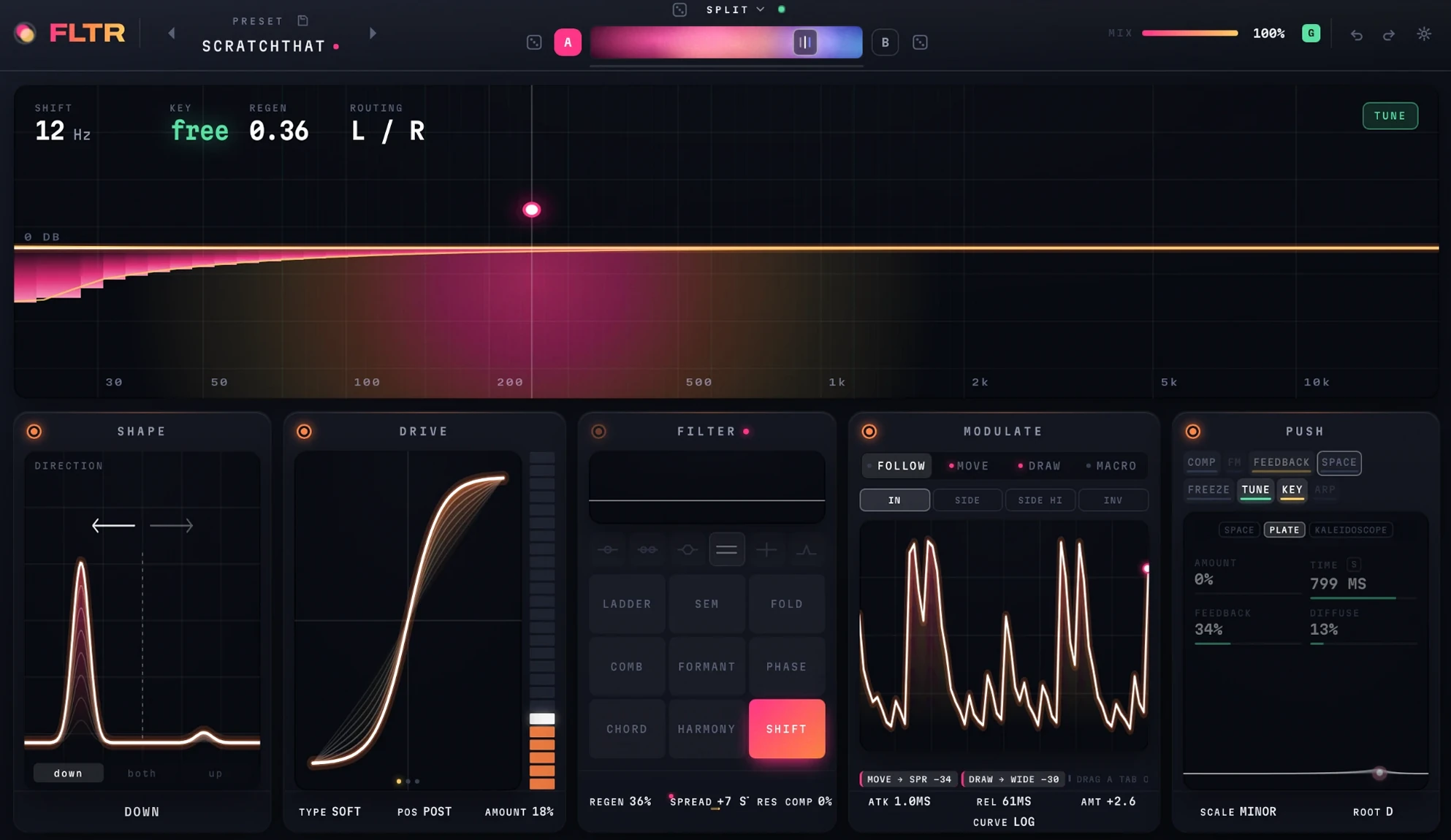
THE PADdrag the dot - across for the shift, up for regen
SHIFThow far every frequency is moved, in Hztrya few Hz beats like a slow phaser; hundreds turn a chord into a bell
KEYthe note the filter is ringing on - free until tune is on and resonance is past half
REGENfeedback round the shifter, which is what makes it spiral
ROUTINGhow the cores are wired, and how many are running
TUNEsnaps the cutoff to the nearest note of the scaletrysweep the filter and it plays in key
PREVIOUS PRESETsteps back to the preset before this one
PRESETthe name opens the browser - search, folders, save and save astrypresets are plain files in a folder, so they can be moved and shared
SAVEsaves the sound as it stands
NEXT PRESETsteps on to the next preset
ROLLrandomises both sides and the morph type at oncetrythe dice beside A and B roll one side and leave the other
MORPH TYPEhow A becomes B - blend, morph, follow, weave, random or splittrysplit puts A below a crossover and B above it
ROLL Arandomises side A and leaves B as it is
Aone of two complete sounds - click to edit this onetryright-click the bar to copy one side to the other, or swap them
MORPHslides from sound A to sound Btrydrop a modulation tab on it and the morph moves by itself
Bthe second sound, with its own character and settings
ROLL Brandomises side B and leaves A as it is
MIXthe dry signal against the filtered onetrya modulation tab can be dropped here too
GLOBAL MIXone mix for A and B - off, each side keeps its own
UNDOtakes back the last change
REDOputs it back
SETTINGSquality, output trim and auto-gain - the housekeeping, kept off the panel
SHAPE ONtakes shape out of the path and puts it back
DIRECTIONwhich way it shifts - down, both sidebands at once, or up
DOWN, BOTH, UPthe three settings that are exactly one thing
SHAPE NAMEwhere shape is sitting, in words
DRIVE ONtakes drive out of the path and puts it back
DRIVEthe saturation curve - what comes out, against what went intryauto-gain holds the level, so more drive is more colour and not more volume
DRIVE LEVELa meter you can drag - it sets the amount
TYPEsoft, transistor or fold
POSITIONdrive before the filter, or after ittrybefore, the filter smooths the grit; after, the grit is what you hear
AMOUNThow hard the signal is pushed into the curve
FILTER ONtakes the filter out of the path and puts it back
STAGESthe curve of each core on its own, before they are combined
ROUTINGsingle, series, parallel, split left and right, split mid and side, or three bandtrythe shifter is one path - spread is what pulls its two ears apart
LADDERa Moog-style ladderclicksee the panel with a ladder running
SEMtwo poles throughout, so the slope never changesclicksee the panel with the sem running
FOLDa filter whose resonance folds back on itselfclicksee the panel with fold running
COMBa tuned comb - it rings at the cutoff's pitchclicksee the panel with the comb running
FORMANTa filter that speaks in vowelsclicksee the panel with formant running
PHASEa phaser, from four sections to twelveclicksee the panel with the phaser running
CHORDsnaps what passes through onto the notes of a chord in your keyclicksee the panel with chord running
HARMONYrings a chord in your key through a bank of resonatorsclicksee the panel with harmony running
SHIFTa frequency shifter
REGENfeedback round the shifter - the same control as the pad's up and down
SPREADpulls the two ears apart, left up and right down, so they beat
RES COMPgives back the bass that resonance takes awaytrymost of what reads as a thin resonance is the low end going missing
MODULATE ONstops all four sources and starts them again
FOLLOWan envelope follower - the level of the sound moves the controltrydrag the tab onto anything; a chip appears there with the depth
MOVEan LFO, free or in time - sine, triangle, saw, square, random or sample and hold
DRAWa sequence you draw, 32 steps, that follows the playheadtrythe same bar sounds the same on every pass
MACROone hand control, routed to as many places as you like
LISTEN TOwhat follow hears - the input, the sidechain, or the sidechain with its low end taken out
INVERTloud closes what it used to open
SOURCEwhat the source is doing right now, not what it is set to
ROUTESevery place this source is going, and how fartrydrag a chip sideways to change its depth
ATTACKhow fast follow rises with the sound
RELEASEhow slowly it falls backtrya fast attack with a long release is what a follower is for
AMOUNTgain into the follower, 24 dB either way
CURVEthe shape of its response - linear, log or gate
PUSH ONswitches the whole push layer off and on
COMPan opto compressor after the filter - it catches a resonant peak without pumping the rest
FMthe cutoff modulated at audio ratetryfocus low for musical sidebands, high for the metallic version
FEEDBACKthe output back into the filter, through a short delay and a saturatortrycomb rings, spiral climbs or falls for ever, bloom blurs into a wash
SPACEecho and reverb on top of the sound, in three models
FREEZEholds the spectrum and plays it back as a dronetrychop gates it in time, each step a different slice of what was caught
TUNEsnaps the cutoff to a scale, and can follow MIDI
KEYheld MIDI notes become the cutoff's pitch - two voices where a core is free
ARPchord and harmony play the chord one note at a time, in time with the track
MODELspace, plate or kaleidoscope - this is the platetrykaleidoscope is a cascade of echoes that speeds up, each a different colour
AMOUNThow much of it is added on top
TIMEthe plate's sizetryS locks it to the track's tempo
FEEDBACKhow long it carries on
DIFFUSEthe plate's tone
SPACEthe tail as it ringstrydrag the dot - up for amount, across for time